
CAMM Memory Uncovered: The Future of Laptop RAM when you think of upgrading your laptop, what’s the first thing that comes to mind? Probably storage, maybe the processor, or even battery life. But there’s a lesser-known component that’s currently undergoing a remarkable transformation: RAM. More specifically, a new format known as CAMM is quietly reshaping the future of laptop memory.
Laptops are evolving faster than ever, and so are the expectations we place on them. We want sleek designs, extended battery life, and lightning-fast performance—without compromise. Enter CAMM: the Compression Attached Memory Module, a cutting-edge innovation originally spearheaded by Dell, now aiming to become a new industry standard.
What is CAMM Memory?
Let’s start with the basics: What is CAMM Memory?
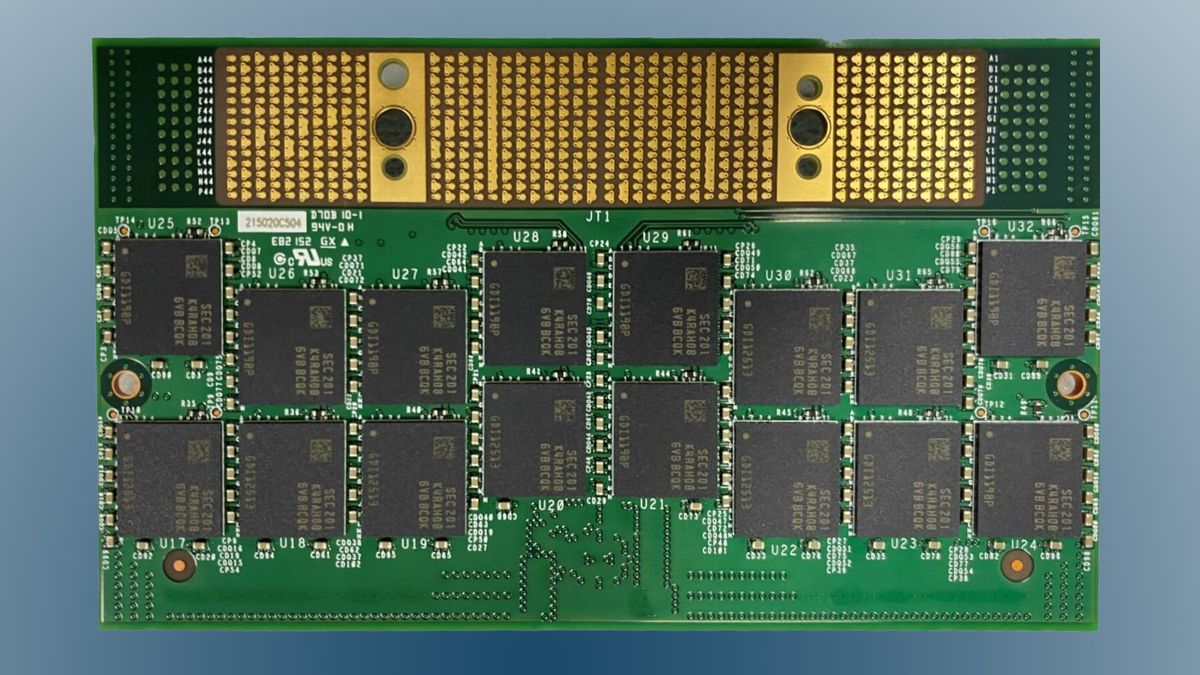
CAMM Memory stands for Compression Attached Memory Module. It’s a brand-new form factor and interface for laptop RAM, designed to overcome the physical and electrical limitations of the long-standing SO-DIMM format. Instead of the traditional stick-like modules that are inserted vertically into slots, CAMM modules are flat and are connected via a set of compression connectors directly to the motherboard.
That flat profile might sound simple, but it’s revolutionary. Why? Because it allows manufacturers to build thinner laptops without sacrificing upgradability or performance. It also opens the door to faster memory speeds and more efficient energy usage.
So, when someone asks what is CAMM Memory, you can say it’s the next step in laptop memory evolution—faster, thinner, cooler, and smarter.
Why Did We Need CAMM?
You might be wondering, “If it ain’t broke, why fix it?” SO-DIMM RAM has been around for decades and has served countless laptops well. But the truth is, it’s showing its age.
Today’s mobile computing landscape demands more. Thinner laptops. Higher memory bandwidth. Lower power consumption. And perhaps most importantly, the ability to scale into future memory technologies like DDR5 and beyond.
SO-DIMM has physical limitations. Its vertical design consumes precious space inside laptops. Its electrical layout struggles to handle higher frequencies and denser memory configurations efficiently. That’s where CAMM shines.
CAMM addresses these issues head-on:
- Lower Profile: Because it sits flat against the motherboard, it enables thinner and lighter laptop designs.
- Faster Speeds: CAMM is designed to support the next-generation DDR5 memory and beyond.
- Improved Thermal Management: A flat design spreads heat over a larger surface area, improving cooling efficiency.
- Potentially Easier Upgrades: Unlike soldered LPDDR RAM, CAMM has the potential to be modular and user-replaceable.
This is more than just an aesthetic shift—it’s an upgrade across the board.
CAMM vs SO-DIMM: The Showdown
To fully grasp CAMM’s promise, it’s helpful to compare it directly to the old champion of laptop RAM: SO-DIMM.
Performance-wise, CAMM takes the lead. It supports wider buses and faster speeds, enabling higher bandwidth—essential for multitasking, gaming, and heavy workloads.
Physically, CAMM is a dream for hardware designers. It offers more freedom by reducing the vertical footprint of memory modules. That means more room for batteries, fans, or even other components like GPUs.
Thermally, the flat design is a game-changer. Instead of stacking RAM in a tight vertical column with minimal airflow, CAMM spreads out. This allows better heat dispersion and ultimately contributes to system stability and longevity.
Even aesthetically, CAMM gives off a modern, space-age vibe—clean, sleek, and purposeful.
The Role of Dell in CAMM’s Journey
Dell played a crucial role in the development of CAMM. They first introduced the design in their Precision 7000 series workstations. But it wasn’t meant to stay proprietary. In 2022, Dell submitted CAMM to JEDEC for standardization, with the hope that it would be adopted industry-wide.
Why is that important? Because if CAMM remains proprietary, it limits compatibility and increases costs. But if it becomes a JEDEC standard, it means laptop manufacturers around the world can start designing machines using CAMM modules, leading to economies of scale, widespread adoption, and more affordable upgrades for users.
And according to recent reports, JEDEC has approved a version of CAMM—called CAMM2—as the next memory module standard for laptops. The future is officially in motion.
The Technical Specs Behind CAMM
Let’s get a bit nerdy for a moment. CAMM memory modules are designed with advanced signaling and layout techniques that allow for significantly faster memory speeds compared to SO-DIMM. While SO-DIMM typically maxes out at 3200 MHz (DDR4) or 4800 MHz (DDR5), CAMM can theoretically handle much higher frequencies.
The modules use a compression connector system that maintains a secure, high-speed interface between the memory and the motherboard. This results in:
- Reduced Signal Noise
- Lower Latency
- Improved Power Efficiency
- Higher Density Configurations
And here’s something exciting: CAMM may eventually support up to 128GB on a single module, which is a massive step up for mobile professionals, video editors, and 3D artists who depend on memory-heavy applications.
CAMM and Upgradability: Hope for the Modular Future
For years, one of the biggest downsides of ultra-thin laptops has been the loss of upgradable RAM. Many modern machines use soldered LPDDR memory, which means you’re stuck with whatever configuration you bought at the time. No post-purchase upgrades. No swaps.
CAMM changes the game.
Because it’s modular, CAMM can be removed and replaced—at least in its current form. If the standard continues to evolve in favor of consumer access, we could see a new wave of thin laptops that are both powerful and upgradable.
Imagine buying a slim ultrabook today with 16GB of RAM, then upgrading to 32GB or 64GB next year when prices drop. CAMM makes that scenario entirely possible.
Is CAMM Backward Compatible?
Unfortunately, no. CAMM is not backward compatible with SO-DIMM slots. That means older laptops can’t use CAMM modules, and CAMM-equipped laptops won’t accept traditional RAM sticks.
However, this isn’t unusual for a new memory standard. The transition from DDR3 to DDR4, and then from DDR4 to DDR5, all involved breaking compatibility. Over time, as CAMM becomes more common, laptop manufacturers and memory suppliers will adapt.
Early adopters may face some compatibility limitations, but they’ll also be the first to experience its full potential.
Who Will Benefit Most from CAMM?
CAMM has broad appeal, but certain groups stand to benefit the most:
- Creative Professionals: Designers, video editors, and 3D animators who rely on memory-intensive workflows will love the extra bandwidth and larger capacities.
- Gamers: Expect smoother gameplay, faster load times, and better multitasking performance.
- Business Power Users: For those running virtual machines, data analysis software, or heavy multitasking environments.
- Laptop Manufacturers: Slimmer laptops, better battery life, and enhanced cooling without sacrificing performance.
Even casual users will feel the difference, especially in devices built around silent operation, heat efficiency, and lightweight mobility.
Will CAMM Become the New Standard?
All signs point to yes. With JEDEC’s involvement, industry-wide support is growing. Memory makers like Micron, Kingston, and Crucial are already experimenting with CAMM-compatible products. Laptop OEMs are exploring it, too—especially those who want to offer powerful ultrabooks or mobile workstations.
Over the next few years, we’ll likely see a gradual shift. SO-DIMM will stick around for budget and legacy systems, while CAMM becomes the go-to for high-end and thin-and-light machines.
By 2026, we may look back and wonder how we ever lived without it.
The Road Ahead: CAMM in Everyday Laptops
Right now, CAMM memory is still in its early adoption phase. It’s popping up mostly in professional workstations and high-performance laptops. But like all technologies, as manufacturing scales and costs go down, expect CAMM to move into mid-range and even budget-friendly devices.
Laptop enthusiasts and PC builders should keep an eye out for CAMM-compatible models and memory kits. With time, upgrading your laptop RAM may become as easy—and satisfying—as upgrading your desktop.
Final Thoughts
So, what is CAMM Memory? It’s a leap forward. A rethinking of how laptop memory should look, perform, and integrate with the rest of the system. With its thinner form factor, improved thermal handling, higher speeds, and promise of upgradability, CAMM is poised to change everything we know about mobile computing.
If you’re planning to buy a new laptop soon, look for CAMM compatibility. If you’re a techie, builder, or gamer, get ready to embrace a memory format that’s faster, flatter, and just plain smarter.
The future of RAM is here—and it’s compressed, powerful, and ready to go.


